I was caught off-guard by the title of Ben Nadel's recent blog post "Text Nodes Do Not Always Exists in a ColdFusion XML Document." After reading his article, I realized he was mistaken.
Here's the code he gave us:
<!--- Create a ColdFusion XML document. --->
<cfxml variable="xmlGirl">
<girl>
<name>Hayden Panettiere</name>
<age>18</age>
<height></height>
<weight></weight>
<description>
Hayden played Claire, the Cheerleader, on the hit
Fox television show, Heroes.
</description>
</girl>
</cfxml>
<!--- Dump out XML document. --->
<cfdump
var="#xmlGirl#"
label="Girl: Hayden Panettiere"
/>
You'll notice that there area two empty elements, "height" and "weight." Using ColdFusion's <cfdump var="#yourXmlVariableNameHere#" /> feature displays some awesome information. Using the code above, the CFDump shows us this:
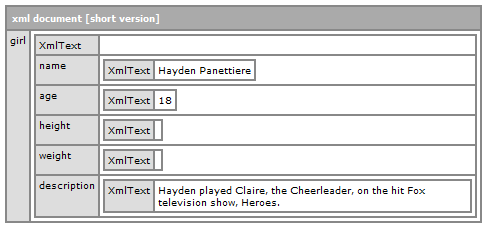
Now, keep in mind, this is only the "Short Version" of what is actually in the dump. If you click on the title bar of the CFDump, it will expand to show evern more information in the "Long Version." Here's a cropped version:
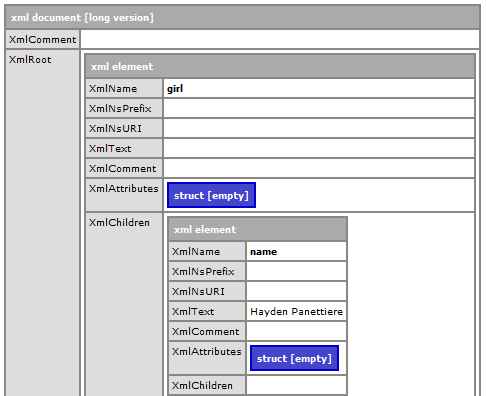
Both the short and long versions show there are a number of element nodes for each xml element. Just because the element is "empty" does not mean it doesn't exist. It's just, well ... empty.
I even ran a little test with this code:
<cfoutput>
#xmlGirl["girl"]["name"][1]#<br />
#xmlGirl["girl"]["age"][1]#<br />
#xmlGirl["girl"]["weight"][1]#<br />
#xmlGirl["girl"]["height"][1]#<br />
#xmlGirl["girl"]["description"][1]#
</cfoutput>
This produced:

Obviously, the line-breaks are showing up,and when I viewed the source, I could see the elements being produced:
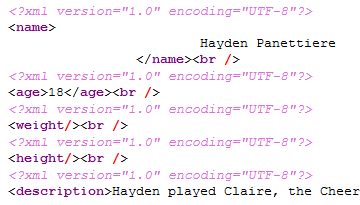
And both "weight" and "height" are there, but they're just empty elements.
As Ben pointed out in his article, when an xml document has an empty element, you end up with a scenario akin to NULL's in a SQL database. Unfortunately, you can't just test for NULL or an empty element with closed quotes. However using the magic of XML Path Language, XPath, you can write some fairly sophisticated arguments.
In fact, Ben was on the "Path" (no pun intended) to finding the answer, he only needed to modify his XmlSearch() to include finding empty text nodes.
Here's my modified XPath statement to show only empty text() nodes:
<!--- this returns only empty text() --->
<cfset arrNodes = XmlSearch(xmlGirl, "//*[ (boolean(text()) = 0) ]") />
<!--- Output names of nodes. --->
<cfoutput>
<cfloop index="xmlNode"
array="#arrNodes#">
#xmlNode.XmlName#<br />
</cfloop>
</cfoutput>
Using this method, you could also test for text() nodes that aren't empty:
<!--- this returns only non-empty text() --->
<cfset arrNodes = XmlSearch(xmlGirl, "//*[ (boolean(text()) = 1) ]") />
<!--- Output names of nodes. --->
<cfoutput>
<cfloop index="xmlNode"
array="#arrNodes#">
#xmlNode.XmlName#<br />
</cfloop>
</cfoutput>
Obviously, you could combine the statements to find all text() nodes:
<!--- this returns ALL text() --->
<cfset arrNodes = XmlSearch(xmlGirl, "//*[ (boolean(text()) = 0) or (boolean(text()) = 1) ]") />
<!--- Output names of nodes. --->
<cfoutput>
<cfloop index="xmlNode"
array="#arrNodes#">
#xmlNode.XmlName#<br />
</cfloop>
</cfoutput>
Enjoy!