CGI Variables and Their Respective ColdFusion/Java Servlet Alternative Methods

Are you a ColdFusion developer? Have you ever wanted to get away from using CGI variables such as CGI.SCRIPT_NAME but didn't quite know what else to use? Then you might find the following list of CGI variables and their respective ColdFusion/Java Servlet Alternative methods to be helpful because I couldn't find much (if any) documentation on this:

CGI Variable ColdFusion / Java Servlet Alternative Method
CGI.AUTH_TYPE getPageContext().getRequest().getAuthType()
CGI.CONTENT_LENGTH getPageContext().getRequest().getContentLength()
CGI.CONTEXT_PATH getPageContext().getRequest().getContextPath()
CGI.CONTENT_TYPE getPageContext().getRequest().getContentType()
CGI.PATH_INFO getPageContext().getRequest().getPathInfo()
CGI.PATH_TRANSLATED getPageContext().getRequest().getPathTranslated()
CGI.QUERY_STRING getPageContext().getRequest().getQueryString()
CGI.REMOTE_ADDR getPageContext().getRequest().getRemoteAddr()
CGI.REMOTE_HOST getPageContext().getRequest().getRemoteHost()
CGI.REMOTE_USER getPageContext().getRequest().getRemoteUser()
CGI.REQUEST_METHOD getPageContext().getRequest().getMethod()
CGI.SCRIPT_NAME getPageContext().getRequest().getServletPath()
CGI.SERVER_NAME getPageContext().getRequest().getServerName()
CGI.SERVER_PORT getPageContext().getRequest().getServerPort()
CGI.SERVER_PORT_SECURE getPageContext().getRequest().isSecure()
CGI.SERVER_PROTOCOL getPageContext().getRequest().getProtocol()
CGI.SERVER_SOFTWARE getPageContext().getRequest().getHeader("Server-Software")
CGI.HTTP_ACCEPT getPageContext().getRequest().getHeader("Accept")
CGI.HTTP_ACCEPT_CHARSET getPageContext().getRequest().getHeader("Accept-Charset")
CGI.HTTP_ACCEPT_ENCODING getPageContext().getRequest().getHeader("Accept-Encoding")
CGI.HTTP_ACCEPT_LANGUAGE getPageContext().getRequest().getHeader("Accept-Language")
CGI.HTTP_CONNECTION getPageContext().getRequest().getHeader("Connection")
CGI.HTTP_COOKIE getPageContext().getRequest().getHeader("Cookie")
CGI.HTTP_HOST getPageContext().getRequest().getHeader("Host")
CGI.HTTP_REFERER getPageContext().getRequest().getHeader("Referer")
CGI.HTTP_USER_AGENT getPageContext().getRequest().getHeader("User-Agent")
 
Other Useful Java Servlets  
Reconstructs the URL the client used to make the request. The returned URL contains a protocol, server name, port number, and server path, but it does not include query string parameters. getPageContext().getRequest().getRequestURL()
The URL string corresponding to the current client request. The string returned does not include the server name or query arguments. getPageContext().getRequest().getRequestURI()
Returns the name of the scheme used to make this request (http, https, or ftp) getPageContext().getRequest().getScheme()

Here's some code you can use to copy and paste to your .cfm file for testing:


<cfoutput>
    <table border="1">
        <tr>
            <th>CGI Variable</th>
            <th>Displays</th>
            <th>ColdFusion / Java Servlet Alternative Method</th>
            <th>Displays</th>
        </tr>
        <tr>
            <td>CGI.AUTH_TYPE</td>
            <td>#CGI.AUTH_TYPE#</td>
            <td>getPageContext().getRequest().getAuthType()</td>
            <td>#getPageContext().getRequest().getAuthType()#</td>
        </tr>
        <tr>
            <td>CGI.CONTENT_LENGTH</td>
            <td>#CGI.CONTENT_LENGTH#</td>
            <td>getPageContext().getRequest().getContentLength()</td>
            <td>#getPageContext().getRequest().getContentLength()#</td>
        </tr>
        <tr>
            <td>CGI.CONTEXT_PATH</td>
            <td>#CGI.CONTEXT_PATH#</td>
            <td>getPageContext().getRequest().getContextPath()</td>
            <td>#getPageContext().getRequest().getContextPath()#</td>
        </tr>
        <tr>
            <td>CGI.CONTENT_TYPE</td>
            <td>#CGI.CONTENT_TYPE#</td>
            <td>getPageContext().getRequest().getContentType()</td>
            <td>#getPageContext().getRequest().getContentType()#</td>
        </tr>
        <tr>
            <td>CGI.PATH_INFO</td>
            <td>#CGI.PATH_INFO#</td>
            <td>getPageContext().getRequest().getPathInfo()</td>
            <td>#getPageContext().getRequest().getPathInfo()#</td>
        </tr>
        <tr>
            <td>CGI.PATH_TRANSLATED</td>
            <td>#CGI.PATH_TRANSLATED#</td>
            <td>getPageContext().getRequest().getPathTranslated() </td>
            <td>#getPageContext().getRequest().getPathTranslated()#</td>
        </tr>
        <tr>
            <td>CGI.QUERY_STRING</td>
            <td>#CGI.QUERY_STRING#</td>
            <td>getPageContext().getRequest().getQueryString()</td>
            <td>#getPageContext().getRequest().getQueryString()#</td>
        </tr>
        <tr>
            <td>CGI.REMOTE_ADDR</td>
            <td>#CGI.REMOTE_ADDR#</td>
            <td>getPageContext().getRequest().getRemoteAddr()</td>
            <td>#getPageContext().getRequest().getRemoteAddr()#</td>
        </tr>
        <tr>
            <td>CGI.REMOTE_HOST</td>
            <td>#CGI.REMOTE_HOST#</td>
            <td>getPageContext().getRequest().getRemoteHost()</td>
            <td>#getPageContext().getRequest().getRemoteHost()#</td>
        </tr>
        <tr>
            <td>CGI.REMOTE_USER</td>
            <td>#CGI.REMOTE_USER#</td>
            <td>getPageContext().getRequest().getRemoteUser()</td>
            <td>#getPageContext().getRequest().getRemoteUser()#</td>
        </tr>
        <tr>
            <td>CGI.REQUEST_METHOD</td>
            <td>#CGI.REQUEST_METHOD#</td>
            <td>getPageContext().getRequest().getMethod()</td>
            <td>#getPageContext().getRequest().getMethod()#</td>
        </tr>
        <tr>
            <td>CGI.SCRIPT_NAME</td>
            <td>#CGI.SCRIPT_NAME#</td>
            <td>getPageContext().getRequest().getServletPath()</td>
            <td>#getPageContext().getRequest().getServletPath()#</td>
        </tr>
        <tr>
            <td>CGI.SERVER_NAME</td>
            <td>#CGI.SERVER_NAME#</td>
            <td>getPageContext().getRequest().getServerName()</td>
            <td>#getPageContext().getRequest().getServerName()#</td>
        </tr>
        <tr>
            <td>CGI.SERVER_PORT</td>
            <td>#CGI.SERVER_PORT#</td>
            <td>getPageContext().getRequest().getServerPort()</td>
            <td>#getPageContext().getRequest().getServerPort()#</td>
        </tr>
        <tr>
            <td>CGI.SERVER_PORT_SECURE</td>
            <td>#CGI.SERVER_PORT_SECURE#</td>
            <td>getPageContext().getRequest().isSecure()</td>
            <td>#getPageContext().getRequest().isSecure()#</td>
        </tr>
        <tr>
            <td>CGI.SERVER_PROTOCOL</td>
            <td>#CGI.SERVER_PROTOCOL#</td>
            <td>getPageContext().getRequest().getProtocol()</td>
            <td>#getPageContext().getRequest().getProtocol()#</td>
        </tr>
        <tr>
            <td>CGI.SERVER_SOFTWARE</td>
            <td>#CGI.SERVER_SOFTWARE#</td>
            <td>getPageContext().getRequest().getHeader("Server-Software")</td>
            <td>#getPageContext().getRequest().getHeader("Server-Software")#</td>
        </tr>
        <tr>
            <td>CGI.HTTP_ACCEPT</td>
            <td>#CGI.HTTP_ACCEPT#</td>
            <td>getPageContext().getRequest().getHeader("Accept")</td>
            <td>#getPageContext().getRequest().getHeader("Accept")#</td>
        </tr>
        <tr>
            <td>CGI.HTTP_ACCEPT_CHARSET</td>
            <td>#CGI.HTTP_ACCEPT_CHARSET#</td>
            <td>getPageContext().getRequest().getHeader("Accept-Charset")</td>
            <td>#getPageContext().getRequest().getHeader("Accept-Charset")#</td>
        </tr>
        <tr>
            <td>CGI.HTTP_ACCEPT_ENCODING</td>
            <td>#CGI.HTTP_ACCEPT_ENCODING#</td>
            <td>getPageContext().getRequest().getHeader("Accept-Encoding")</td>
            <td>#getPageContext().getRequest().getHeader("Accept-Encoding")#</td>
        </tr>
        <tr>
            <td>CGI.HTTP_ACCEPT_LANGUAGE</td>
            <td>#CGI.HTTP_ACCEPT_LANGUAGE#</td>
            <td>getPageContext().getRequest().getHeader("Accept-Language")</td>
            <td>#getPageContext().getRequest().getHeader("Accept-Language")#</td>
        </tr>
        <tr>
            <td>CGI.HTTP_CONNECTION</td>
            <td>#CGI.HTTP_CONNECTION#</td>
            <td>getPageContext().getRequest().getHeader("Connection")</td>
            <td>#getPageContext().getRequest().getHeader("Connection")#</td>
        </tr>
        <tr>
            <td>CGI.HTTP_COOKIE</td>
            <td>#CGI.HTTP_COOKIE#</td>
            <td>getPageContext().getRequest().getHeader("Cookie")</td>
            <td>#getPageContext().getRequest().getHeader("Cookie")#</td>
        </tr>
        <tr>
            <td>CGI.HTTP_HOST</td>
            <td>#CGI.HTTP_HOST#</td>
            <td>getPageContext().getRequest().getHeader("Host")</td>
            <td>#getPageContext().getRequest().getHeader("Host")#</td>
        </tr>
        <tr>
            <td>CGI.HTTP_REFERER</td>
            <td>#CGI.HTTP_REFERER#</td>
            <td>getPageContext().getRequest().getHeader("Referer")</td>
            <td>#getPageContext().getRequest().getHeader("Referer")#</td>
        </tr>
        <tr>
            <td>CGI.HTTP_USER_AGENT</td>
            <td>#CGI.HTTP_USER_AGENT#</td>
            <td>getPageContext().getRequest().getHeader("User-Agent")</td>
            <td>#getPageContext().getRequest().getHeader("User-Agent")#</td>
        </tr>
        <tr>
            <td colspan="4"> </td>
        </tr>
        <tr>
            <td><em><strong>Other Useful Java Servlets</strong></em></td>
            <td> </td>
            <td> </td>
            <td> </td>
        </tr>
        <tr>
            <td>Reconstructs the URL the client used to make the request. The returned URL contains a protocol, server name, port number, and server path, but it <em>does not include</em> query string parameters. </td>
            <td> </td>
            <td>getPageContext().getRequest().getRequestURL()</td>
            <td>#getPageContext().getRequest().getRequestURL()#</td>
        </tr>
        <tr>
            <td>The URL string corresponding to the current client request. The string returned does not include the server name or query arguments.</td>
            <td> </td>
            <td>getPageContext().getRequest().getRequestURI()</td>
            <td>#getPageContext().getRequest().getRequestURI()#</td>
        </tr>
        <tr>
            <td>Returns the name of the scheme used to make this request (http, https, or ftp)</td>
            <td> </td>
            <td>getPageContext().getRequest().getScheme()</td>
            <td>#getPageContext().getRequest().getScheme()#</td>
        </tr>
    </table>
</cfoutput>

Obviously, you should test these on your server before using them in production. Some of the methods may or may not be available. For example, I get empty strings using getPathInfo() and getPathTranslated(). You might want to try something like the following to see what methods are available on your server:


    <cfset availMethods = GetPageContext().getRequest() />
    <cfdump var="#availMethods#" />
    

Here's some more interesting information. Let's say you've defined some variables in a 'globalvariables.cfm' file and included them in your Application.cfc template, such as:


    <cfset REQUEST.RootDirectory = expandpath('/') />
    <cfset REQUEST.CurrentDirectory = GetDirectoryFromPath(GetTemplatePath()) />
    <cfset REQUEST.CurrentPage = GetFileFromPath(GetBaseTemplatePath()) />
    

If you run the following code, you should see what you also expected to see by simply using <cfoutput>#REQUEST.RootDirectory#</cfoutput> or <cfoutput>#REQUEST.CurrentDirectory#</cfoutput>.


    <cfoutput>
    #getPageContext().getRequest().RootDirectory#<br />
    #getPageContext().getRequest().CurrentDirectory#<br />
    #getPageContext().getRequest().CurrentPage#
    </cfoutput>
    

Just for fun, try this too:


    <cfset dirlist = getPageContext().getRequest().CurrentDirectory />
    <ul>
        <cfloop list="#dirlist#" delimiters="\" index="i">
            <cfoutput><li>#i#</li></cfoutput>
        </cfloop>
    </ul>
    

For more information on the Java HttpServletRequest: http://java.sun.com/products/servlet/2.2/javadoc/javax/servlet/http/HttpServletRequest.html

For more informaiton on HTTP Header Field Definitions, see: http://www.w3.org/Protocols/rfc2616/rfc2616-sec14.html

If you catch a typo or have some other insight, please feel free to add to this.

Use ColdFusion to Dynamically Split Content into 2- and 3-Columns

Recently, I needed to dynamically divide content up between two and three columns, (clients can be picky, can't they?), and thought I would share what I came up with. I'm sure there are/have been others who have done this sort of thing before, but sometimes it's just more fun to do it yourself. If you've done this in a simpler method, please feel free to share.

The main idea here is to pull a news article from a database, and use ColdFusion to then divide up the article in a way that could be displayed over a 2- or 3-column layout. I'll just try to explain my thought process here and show how I executed my plan.

Most news articles (or 'content' in general) are merely lists of words (and sometimes other elements, such as html markup) separated by a space. So if I could calculate the number of list items, I could simply perform a few more calculations to determine starting and ending points in outputting the 'list' or content. For example, if I wanted a 2-column layout, first I would want to determine the length of the list by using something like LISTLEN(). So let's start there:


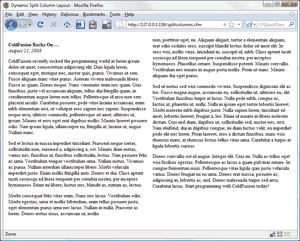
<cfset myQuery.content = "<p><strong>ColdFusion Rocks On …</strong><br /><em>August 21, 2008</em></p><p>ColdFusion recently rocked the programming world at lorem ipsum dolor sit amet, consectetuer adipiscing elit. Duis ligula lorem, consequat eget, tristique nec, auctor quis, purus. Vivamus ut sem. Fusce aliquam nunc vitae purus. Aenean viverra malesuada libero. Fusce ac quam. Donec neque. Nunc venenatis enim nec quam. Cras faucibus, justo vel accumsan aliquam, tellus dui fringilla quam, in condimentum augue lorem non tellus. Pellentesque id arcu non sem placerat iaculis. Curabitur posuere, pede vitae lacinia accumsan, enim nibh elementum orci, ut volutpat eros sapien nec sapien. Suspendisse neque arcu, ultrices commodo, pellentesque sit amet, ultricies ut, ipsum. Mauris et eros eget erat dapibus mollis. Mauris laoreet posuere odio. Nam ipsum ligula, ullamcorper eu, fringilla at, lacinia ut, augue. Nullam nunc.</p><p>Sed et lectus in massa imperdiet tincidunt. Praesent neque tortor, sollicitudin non, euismod a, adipiscing a, est. Mauris diam metus, varius nec, faucibus at, faucibus sollicitudin, lectus. Nam posuere felis ac urna. Vestibulum tempor vestibulum urna. Nullam metus. Vivamus ac purus. Nullam interdum ullamcorper libero. Morbi vehicula imperdiet justo. Etiam mollis fringilla ante. Donec et dui. Class aptent taciti sociosqu ad litora torquent per conubia nostra, per inceptos hymenaeos. Etiam mi libero, luctus nec, blandit ac, rutrum ac, lectus.</p><p>Morbi consequat felis vitae enim. Nunc nec lacus. Vestibulum odio. Morbi egestas, urna et mollis bibendum, enim tellus posuere justo, eget elementum purus urna nec lacus. Nullam in nulla. Praesent ac lorem. Donec metus risus, accumsan ut, mollis non, porttitor eget, mi. Aliquam aliquet, tortor a elementum aliquam, erat odio sodales eros, suscipit blandit lectus dolor sit amet elit. In eros wisi, mollis vitae, tincidunt in, suscipit id, nibh. Class aptent taciti sociosqu ad litora torquent per conubia nostra, per inceptos hymenaeos. Phasellus ornare. Suspendisse potenti. Mauris convallis. Vestibulum nec mauris in augue porta mollis. Proin ut nunc. Mauris aliquam dui eget purus.</p><p>Sed ut metus sed wisi commodo viverra. Suspendisse dignissim elit ac leo. Fusce magna augue, accumsan eu, sollicitudin ut, ultricies eu, elit. Vestibulum faucibus turpis at lacus. Nulla pede nibh, congue ac, luctus at, pharetra ut, nulla. Nulla in ipsum eget tortor lobortis laoreet. Morbi molestie nibh dapibus justo. Nulla sapien lorem, tincidunt sit amet, lobortis laoreet, feugiat a, leo. Etiam id mauris in libero molestie dictum. Cras nisl diam, dapibus ut, sollicitudin sed, auctor nec, orci. Nam eleifend, dui in dapibus congue, mi diam luctus velit, eu imperdiet pede elit nec lorem. Proin laoreet, eros a dictum faucibus, nunc wisi rhoncus nunc, at rhoncus lectus tellus vitae urna. Curabitur a turpis at ligula lobortis cursus.</p><p>Donec convallis est id augue. Integer elit. Cras mi. Nulla ac tellus eget wisi facilisis egestas. Pellentesque ac lacus a quam pulvinar ornare. In congue fermentum risus. Pellentesque vitae ligula quis justo vehicula varius. Donec feugiat mi eu urna. Donec erat massa, posuere ac, adipiscing in, lobortis ac, nisl. Donec malesuada turpis sed arcu. Curabitur lacus. Start programming with ColdFusion today!</p>" />

    
<cfset myListCount = listLen(myQuery.content, " ") />

So as you can see, I'm holding the total list length in a variable called myListCount. Now, by dividing the total length (myListCount) by two (2), I could find the 'half-way' point in the list. But wait, what happens if the 'half-way' point becomes a fraction? Easy enough, I would just use ROUND() to clean that up. Cool?


<cfset halfCount = round(myListCount/2) />

Now, all I have to do is determine the 'starting point' for the remaining half of the list. Since we have determined the halfway point and are holding the number in a variable called halfCount, would could simply add one (1) to the halfway point. Doing so will tell us exactly where to begin our second (or last) half.


<cfset lastHalf = halfCount + 1 />

Let's take an inventory of what we have to work with so far. We know the beginning of the list (which is always 1, most of the time), we have the ending point (myListCount), the halfway point (halfCount) and the starting point of the second half (lastHalf). The last thing we have to do is whip up some CFLOOP statements using these variables and determine where we want to output the data. For simplicity, I'll create and use a 2-column table, placing the first half in the left column and the last half in the right column.


<cfoutput>
<table border="0" cellspacing="5" cellpadding="5">
    <tr>
        <td valign="top" width="50%"><cfloop from="1" to="#halfcount#" index="i">#listGetAt(myQuery.content, i, " ")# </cfloop></td>
        <td valign="top" width="50%"><cfloop from="#lasthalf#" to="#myListCount#" index="i">#listGetAt(myQuery.content, i, " ")# </cfloop></td>
    </tr>
</table>
</cfoutput>

This code should produce something similar to:

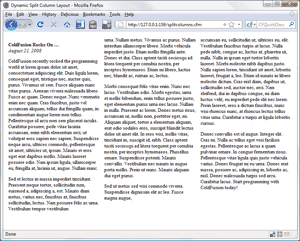
And that's pretty much it. Using similar thought processes, here's an example of using ColdFusion to spread content over a 3-column table:


<cfscript>
    myListCount = listLen(myQuery.content, " ");
    thirdcount = round(myListCount/3);
    secondthirdstart = thirdcount + 1;
    secondthirdend = thirdcount * 2;
    lastthird = secondthirdend + 1;
</cfscript>

<cfoutput>
<table border="0" cellspacing="5" cellpadding="5">
    <tr>
        <td valign="top" width="33%"><cfloop from="1" to="#thirdcount#" index="i">#listGetAt(myQuery.content, i, " ")# </cfloop></td>
        <td valign="top" width="33%"><cfloop from="#secondthirdstart#" to="#secondthirdend#" index="i">#listGetAt(myQuery.content, i, " ")# </cfloop></td>
        <td valign="top" width="33%"><cfloop from="#lastthird#" to="#myListCount#" index="i">#listGetAt(myQuery.content, i, " ")# </cfloop></td>
    </tr>
</table>
</cfoutput>

This code should produce something similar to:

Hope this helps!

Using ColdFusion to Create an Ebay-esque Auction Countdown Timer Custom Tag

The other day I read one of Ben Nadel's "Ask Ben" posts where a reader asked about calculating the difference between two dates and wanted to know how to display the estimated time left to buy ... much like ebay. Ben did a great job of giving a brief explanation on calculating the difference between two dates and kind of left it at that.

This sounded interesting to me and I couldn't resist the challenge to create a ColdFusion custom tag to handle the calculations and even display (to a limited degree of course). So here's what I came up with:


<cfsetting enablecfoutputonly="yes">
<!---

    Document:        /extensions/customtags/auctiontimer.cfm
    Author:            Steve Withington | www.stephenwithington.com
    Creation Date:    August 15, 2008
    Copyright:        (c) 2008 Stephen Withington | www.stephenwithington.com
    
    Purpose:        Outputs an ebay-esque count down timer.

    Instructions:    Place this template in your custom tags folder. Simply call the custom tag using
                    whatever method you're comfortable with and pass in at least a valid date for the
                    ATTRIBUTES.dateEnd variable.

                    Accepts 2 ATTRIBUTES:
                    1) dateStart    (optional, DATETIME)
                    2) dateEnd        (optional, DATETIME) - typically passed in with a query DATETIME value.

                    Example Usage:    <cf_auctiontimer dateEnd="8/15/2008 9:40 AM">
                    
    
    Revision Log:    
    12/4/2008 - sjw - Added code to a) ensure the dateStart occurs prior to dateEnd and b) if dateStart has
    already passed, then adjust dateStart to now().
    05/14/2010 - sjw - Hopefully squashed an annoying bug with the 'hours2go' var.

--->

<cfsetting enablecfoutputonly="no">
<!--- if defined <style>'s haven't been output yet --->
<cfif NOT isDefined("REQUEST.localStyle")>
<style type="text/css">
<!--
.boldred {
    font-weight: bold;
    color: #FF0000;
}
-->

</style>
<!--- remember the <style>'s have been output so we don't output it again --->
<cfset REQUEST.localStyle = "true" />
</cfif>
<cfsetting enablecfoutputonly="yes">
<cfparam name="ATTRIBUTES.dateStart" default="#now()#" />
<cfparam name="ATTRIBUTES.dateEnd" default="#now()#" />

<!--- I prefer to throw a friendly error message instead of using 'type' in the cfparams for this tag --->
<cfif NOT isValid("date", ATTRIBUTES.dateStart)>
    <cfthrow message="dateStart must be a valid DATE" detail="The value #ATTRIBUTES.dateStart# is not a valid DATE. For example, #dateformat(now(), 'mm/dd/yyyy')# #timeformat(now(), 'h:mm:ss tt')# is a valid DATETIME value." />
</cfif>
<cfif NOT isValid("date", ATTRIBUTES.dateEnd)>
    <cfthrow message="dateEnd must be a valid DATE" detail="The value #ATTRIBUTES.dateEnd# is not a valid DATE. For example, #dateformat(now(), 'mm/dd/yyyy')# #timeformat(now(), 'h:mm:ss tt')# is a valid DATETIME value." />
</cfif>

<!--- if the start date is greater than the end date, throw an error --->
<cfset compareGivenDates = DateCompare(ATTRIBUTES.dateStart, ATTRIBUTES.dateEnd, "s")>
<cfif compareGivenDates eq 1>
    <cfthrow message="Ooops! dateStart must occur before dateEnd." detail="The value #ATTRIBUTES.dateStart# should be a valid DATE that occurs before #ATTRIBUTES.dateEnd#." />
</cfif>

<!--- if the start date has already past, if so, then start date should be rightNow --->
<cfset rightNow = dateformat(now(), "mm/dd/yyyy") & " " & timeformat(now(), "hh:mm:ss tt") />
<cfset compareNow = DateCompare(rightNow, ATTRIBUTES.dateStart, "s") />
<cfswitch expression="#compareNow#">
    <cfcase value="-1">
        <cfthrow message="Bidding hasn't started yet!" detail="Whoa there buddy ... the bidding will open soon. Come back later, ok?" />
    </cfcase>
    <cfcase value="1">
        <cfset ATTRIBUTES.dateStart = rightNow />
    </cfcase>
</cfswitch>

<!--- scope the final return variable --->
<cfset returnTimeRemaining="" />

<cfset dateStart = dateformat(ATTRIBUTES.dateStart, "mm/dd/yyyy") & " " & timeformat(ATTRIBUTES.dateStart, "hh:mm:ss tt") />
<cfset dateEnd = dateformat(ATTRIBUTES.dateEnd, "mm/dd/yyyy") & " " & timeformat(ATTRIBUTES.dateEnd, "hh:mm:ss tt") />

<cfset hdif = Abs(DateDiff("h", dateEnd, dateStart)) />
<cfset ndif = Abs(DateDiff("n", dateEnd, dateStart)) />
<cfset sdif = Abs(DateDiff("s", dateEnd, dateStart)) />

<cfset years2go = Abs(DateDiff("yyyy", dateEnd, dateStart)) />
<cfset months2go = Abs(DateDiff("m", dateEnd, dateStart)) />
<cfset weeks2go = Abs(DateDiff("ww", dateEnd, dateStart)) />
<cfset days2go = Abs(DateDiff("d", dateEnd, dateStart)) />

<cfif datepart('h', now()) lt 12 or days2go eq 1>
    <cfset h = 'h' />
<cfelse>
    <cfset h = 'H' />
</cfif>
<cfset local.hours2go = TimeFormat(dateEnd-dateStart, h) />
<cfset min2go = TimeFormat("#dateEnd-dateStart#", "m") />
<cfset sec2go = TimeFormat("#dateEnd-dateStart#", "s") />

<!--- some modified calculations are needed if there is more than 1 month to go --->
<cfset newmonths = months2go-(years2go*12) />
<cfset tempDate = dateadd("m", months2go, ATTRIBUTES.dateStart) />
<cfset newweeks = Abs(DateDiff("ww", ATTRIBUTES.dateEnd, tempDate)) />
<cfset tempdays = Abs(DateDiff("d", ATTRIBUTES.dateEnd, tempDate)) />
<cfset newdays = tempdays-(newweeks*7) />

<!--- compare the dateStart to dateEnd down to the SECOND --->
<cfset comparison = DateCompare(dateStart, dateEnd, "s") />

<cfswitch expression="#comparison#">
    <!--- Time still remaining --->
    <cfcase value="-1">
        <!--- YEARS TO GO --->
        <cfif years2go GT 1>
            <cfset returnTimeRemaining = returnTimeRemaining & "#years2go#y #newmonths#m #newweeks#w #newdays#d #hours2go#h #min2go#m #sec2go#s" />
        <!--- MONTHS TO GO --->
        <cfelseif months2go GT 1>
            <cfset returnTimeRemaining = returnTimeRemaining & "#months2go#m #newweeks#w #newdays#d #hours2go#h #min2go#m #sec2go#s" />
        <!--- WEEKS TO GO --->
        <cfelseif weeks2go GT 1>
            <!---<cfset newdays = days2go-(weeks2go*7) />--->
            <cfset returnTimeRemaining = returnTimeRemaining & "#weeks2go#w #newdays#d #hours2go#h #min2go#m #sec2go#s" />
        <!--- DAYS TO GO --->
        <cfelseif hdif GT 24>
            <cfset returnTimeRemaining = returnTimeRemaining & "#days2go#d #hours2go#h #min2go#m #sec2go#s" />
        <!--- HOURS TO GO --->
        <cfelseif ndif GT 60>
            <cfset returnTimeRemaining = returnTimeRemaining & "#hours2go#h #min2go#m #sec2go#s" />
        <!--- MINUTES TO GO --->
        <cfelseif sdif GT 60>
            <cfset returnTimeRemaining = returnTimeRemaining & "<span class=""boldred"">#min2go#m #sec2go#s</span>" />

        <!--- SECONDS TO GO --->
        <cfelseif sdif GT 01>
            <cfset returnTimeRemaining = returnTimeRemaining & "<span class=""boldred"">< 1m</span> <em>or #sec2go#s to be exact.</em>" />
        <!--- TIME HAS ENDED --->
        <cfelse>
            <cfset returnTimeRemaining = "<span class=""boldred"">Time has ended.</span>" />
    </cfif>
    </cfcase>
    <!--- Times are the same. --->
    <cfcase value="0">
        <cfset returnTimeRemaining = "<span class=""boldred"">Ding!</span> It's over … you seriously just missed it!" />
    </cfcase>
    <!--- Time has expired. --->
    <cfcase value="1">
        <cfset returnTimeRemaining = "<strong>Bidding has ended for this item.</strong>" />
    </cfcase>
</cfswitch>

<!--- FINAL OUTPUT --->
<cfoutput>#returnTimeRemaining#</cfoutput>

<cfsetting enablecfoutputonly="no">

There's several calculations going on in there, but ultimately the custom tag can accept two parameters, dateStart and dateEnd. They both default to the current date and time, so if you don't pass anything to it, the countdown would simply reply with "Bidding has ended for this item." The idea though would be to just pass in the ending date (dateEnd) and as long as the ending date is in the future, then a countdown is displayed and formatted quite similar to the one found on ebay.

Assuming you've dropped the code above into a template and placed it into your custom tags folder and named it "auctiontimer.cfm", you could add the following to a page and see the results:


<cfset myQuery.DisplayEndDate = "10/08/2008 2:30 PM" />
<p>Time Left: <cf_auctiontimer dateEnd="#myQuery.DisplayEndDate#"></p>

Would display "Time Left: 7w 2d 12h 39m 45s" - (assuming the page was executed at approximately 1:50 PM on 08/15/2008 that is).

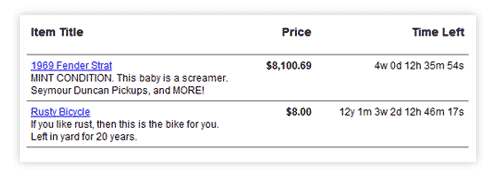
Just for giggles, I created a little more sophisticated example using a query for newbie's trying to figure this stuff out:


<html>
<head>
<title>ebay-esque Auction Countdown Timer: A More Dynamic Example</title>
<style type="text/css">
<!--
body {
    font-family: Arial, Helvetica, sans-serif;
    font-size: 12px;
}
#container {
    clear: both;
    float: left;
    width: 535px;
    padding: 10px;
}
.itemWrapper {
    clear: both;
    float: left;
    width: 525px;
    padding: 5px;
    border-bottom: 1px solid #666;
}
.itemTitle {
    float: left;
    width: 250px;
}
.itemPrice {
    float: left;
    width: 90px;
    text-align: right;
}
.itemEndDate {
    float: right;
    width: 175px;
    text-align: right;
}
-->

</style>
</head>

<body>
<!--- a simple query for testing purposes only --->
<cfset q = queryNew("ItemTitle, ItemDesc, ItemPrice, DisplayEndDate", "VarChar, VarChar, Decimal, Date") />
<cfset newRow = queryAddRow(q, 2) />
<cfset temp = querySetCell(q, "ItemTitle", "1969 Fender Strat", 1) />
<cfset temp = querySetCell(q, "ItemDesc", "MINT CONDITION. This baby is a screamer. Seymour Duncan Pickups, and MORE!", 1) />
<cfset temp = querySetCell(q, "ItemPrice", "8100.69", 1) />
<cfset temp = querySetCell(q, "DisplayEndDate", "09/16/2008 2:08:37 AM", 1) />
<cfset temp = querySetCell(q, "ItemTitle", "Rusty Bicycle ", 2) />
<cfset temp = querySetCell(q, "ItemDesc", "If you like rust, then this is the bike for you. Left in yard for 20 years.", 2) />
<cfset temp = querySetCell(q, "ItemPrice", "8.00", 2) />
<cfset temp = querySetCell(q, "DisplayEndDate", "10/08/2020 2:19:00 PM", 2) />

<div id="container">
    <div class="itemWrapper">
        <div class="itemTitle"><h3>Item Title</h3></div>
        <div class="itemPrice"><h3>Price</h3></div>
        <div class="itemEndDate"><h3>Time Left</h3></div>
    </div>
<cfoutput query="q">
    <div class="itemWrapper">
        <div class="itemTitle"><a href="javascript:void(0);">#ItemTitle#</a><br />
        #ItemDesc#</div>
        <div class="itemPrice"><strong>#dollarformat(ItemPrice)#</strong></div>
        <div class="itemEndDate"><cf_auctiontimer dateEnd="#DisplayEndDate#"></div>
    </div>
</cfoutput>
</div>

</body>
</html>

This would display something like:

So there you have it, an ebay-esque auction countdown timer. There are obviously several other ways to accomplish this but I wanted to have a little fun. Enjoy!

More Entries

© 2026, Stephen J. Withington, Jr.  |  Hosted by Hostek.com

Creative Commons License   |   This work is licensed under a Creative Commons Attribution 3.0 Unported License.