
Launched ColdFusion + Mura CMS Powered Sites for EBL Canopy Zipline Tours

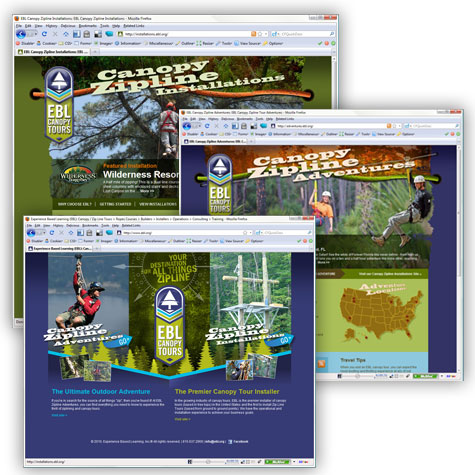
EBL Canopy Tours, launched their completely revamped online presence at www.ebl.org. Technically speaking, three (3) separate sites have been launched for EBL. The main site has become more of a "landing" page allowing visitors to choose the direction they wish to proceed: Canopy Zipline Adventures and Canopy Zipline Installations. The "adventures" site is geared towards those seeking zipline and canopy tour adventures, while the "installations" site is geared towards those seeking the "premier installer of Canopy Zipline Tours."

All of the sites are powered by Adobe® ColdFusion® and Microsoft® SQL Server with online content management provided via Mura CMS. Jaci M.'s fully customized designs were easily integrated into Mura CMS to allow our client the ability to add and edit content while maintaining the original design's integrity.

The sites feature a brand new Mura plugin I've developed called MuraMediaPlayer™ which will soon be released to the general public. MuraMediaPlayer allows our client to easily add media files to any page on their site. I also set up an Amazon S3 for storage of site assets and Amazon CloudFront account to allow for streaming video. In addition, the adventures and installations sites both feature a "weighted-randomized" header for the home pages. Using some Mura class extensions, I enabled the client to upload a header, location details, up to five (5) additional location images and also determine the "Weight for Randomness" for each canopy zipline tour location.

This was definitely a fun project to be a part of and hopefully one of these days, our client will invite us to one of his canopy zipline locations (hint hint!). Congratulations to everyone at EBL, and I look forward to working with you again soon.
EBL
Designer: Jaci M. | Developer: Stephen Withington | Content Management System: Mura CMS

Launched ColdFusion + Mura CMS Powered Site for Mitchell Swaback Charities

Every once in awhile, I'm fortunate enough to be involved in projects that truly "make a difference." This, for me, is one of those projects.

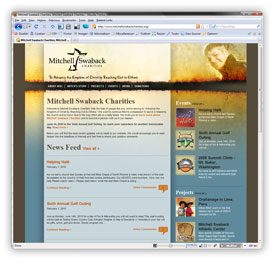
Mitchell Swaback Charities, formerly known as The Mitchell Swaback Foundation, launched their new web site at www.mitchellswabackcharities.org. Mitchell Swaback Charities was started in 2004 by family and friends of Mitchell Swaback after he suffered from a fatal accident on August 14, 2004. They wanted to continue Mitch's "compassion to serve in missions, the church and to honor God in the way Mitch did on a daily basis." For over five years now, they have been busy fulfilling their mission through a variety of projects and events that continue to impact people throughout the world.

The site is powered by Adobe® ColdFusion® and Microsoft® SQL Server with online content management provided via Mura CMS. I was able to fully integrate Jaci M.'s completely custom "bloggishy" design into Mura CMS without a hitch. I leveraged a number of class extensions and custom display objects in Mura CMS to pull everything together.

I was even able to pull in my cfMediaPlayer project from RIAForge to allow the client to upload and display video quickly and easily. Luckily, Amazon added streaming capabilities to CloudFront just in time for me to allow our client to stream their video as well.

Along with a typical "donate online" feature, the client had a few unique needs such as the ability to "flag" nearly any project as "supportable" which would then allow a visitor to direct their donation amount(s) towards that particular project. Other custom e-commerce applications included a "charity event participant sponsorship" application and a complete "golf outing sponsorship and registration" application.

I truly felt privileged to be a part of this project and hope that my work further enables MSC to continue thriving and growing in their mission to "Advance the Kingdom of Christ by Reaching Out to Others." Congratulations and thank you to everyone at Mitchell Swaback Charities.

Mitchell Swaback Charities
Designer: Jaci M. | Developer: Stephen Withington | Content Management System: Mura CMS
Simple User-Defined Function (UDF) to Convert Server Date/Time Stamp Into Local North American Time

Very often, a web server is located in a different time zone from the majority of the visitors (and owner) of a web site. I came up with this user-defined function (UDF) to return a timestamp in the web site owner's local North American timezone. This way, reports, emails, etc. can all have a consistent timestamp.

Valid time zones for North America are: newfoundland, atlantic, eastern, central, mountain, pacific, hawaii, utc. Obviously, I'm using more user-friendly terminology here than EST, CDT, etc.

For more information on North American time zones, visit http://www.timeanddate.com/library/abbreviations/timezones/na/.

This function returns a string as a timestamp. For example: {ts '2010-01-01 01:00:00'}. You can then use dateFormat() and/or timeFormat() to output as desired.

Examples


<cfoutput>
    Central: #getNorthAmericanTimeStamp('central')#<br />
    Pacific: #dateFormat(getNorthAmericanTimeStamp('pacific'), 'mm/dd/yyyy')#<br />
    Hawaii: #timeFormat(getNorthAmericanTimeStamp('hawaii'), 'h:mm:ss tt')#
</cfoutput>

The Code


<!--- Info --------------------------------------------------------------------------------------------------

    Document:        getNorthAmericanTimeStamp.cfc
    Author:            Steve Withington (steve [at] stephenwithington [dot] com)
    Creation Date:    01/08/2010
    Copyright:        (c) 2010 Stephen J. Withington, Jr. | www.stephenwithington.com
    
    Purpose:        I convert the server date/time to any North American timezone date/timestamp.
                    Pass me a timezone, and I'll convert my server date/time to the preferred timezone's
                    date/time and pass it back to you.
    
    Revision Log / Notes:
    01/08/2010 sjw    First release.

-------------------------------------------------------------------------------------------------- /Info --->

<cffunction name="getNorthAmericanTimeStamp" returntype="string" output="false" access="remote">
    <cfargument name="timeZone" type="string" required="false" default="eastern" />
    <cfscript>        
        var local = structNew();
        local.t = structNew();
        local.t.dts = now();
        local.t.tzi = getTimeZoneInfo();
        local.t.utc = dateAdd("s", local.t.tzi.utcTotalOffset, local.t.dts);
        local.timeZones = "newfoundland,atlantic,eastern,central,mountain,pacific,hawaii,utc";

        if ( local.t.tzi.isDSTon ) {
            local.t.newfoundland = dateAdd("n", -150, local.t.utc);            
            local.t.atlantic = dateAdd("h", -3, local.t.utc);
            local.t.eastern = dateAdd("h", -4, local.t.utc);
            local.t.central = dateAdd("h", -5, local.t.utc);
            local.t.mountain = dateAdd("h", -6, local.t.utc);
            local.t.pacific = dateAdd("h", -7, local.t.utc);
            local.t.hawaii = dateAdd("h", -9, local.t.utc);    

        } else {
            local.t.newfoundland = dateAdd("n", -210, local.t.utc);
            local.t.atlantic = dateAdd("h", -4, local.t.utc);
            local.t.eastern = dateAdd("h", -5, local.t.utc);
            local.t.central = dateAdd("h", -6, local.t.utc);
            local.t.mountain = dateAdd("h", -7, local.t.utc);
            local.t.pacific = dateAdd("h", -8, local.t.utc);
            local.t.hawaii = dateAdd("h", -10, local.t.utc);
        };
                    
        if ( listFindNoCase(local.timeZones, arguments.timeZone, ",") ) {
            switch(arguments.timeZone) {
                case "newfoundland":
                    return local.t.newfoundland;
                    break;
                case "atlantic":
                    return local.t.atlantic;
                    break;
                case "eastern":
                    return local.t.eastern;
                    break;
                case "central":
                    return local.t.central;
                    break;
                case "mountain":
                    return local.t.mountain;
                    break;
                case "pacific":
                    return local.t.pacific;
                    break;
                case "hawaii":
                    return local.t.hawaii;
                    break;
                case "utc":
                    return local.t.utc;
                    break;
                default:
                    return local.t.eastern;
            };
        } else {
            return local.t.eastern;
        };    
    
</cfscript>
</cffunction>

Hope this helps!

More Entries

© 2026, Stephen J. Withington, Jr.  |  Hosted by Hostek.com

Creative Commons License   |   This work is licensed under a Creative Commons Attribution 3.0 Unported License.