I Will Be Presenting at BFusion 2009

I am very excited to announce I have just received confirmation that I will be speaking at BFusion 2009! I will be presenting two ninety-minute "hands-on" sessions at BFusion. This means bring your computer and your swimming suit, because we're diving in!

My first hands-on presentation will be "Getting Started with Mura CMS," and the other will be "Integrating Your Custom Design With Mura CMS." These will both be part of the "intermediate" track. The exact details of each session are being worked out at this time and I'll be sure to share them as they solidify.

I was fortunate enough to attend BFusion/BFlex 2008 and was absolutely blown away on so many levels. First, the facility is absolutely top-notch! It's actually held at Indiana University in Bloomington, Indiana. Unlike some of the other conferences I've attended in the past, each person is given internet access and also has easy access to outlets so they can plug in their laptop. Nice. But what do you expect? It is, after all, held in their "University Information Technology Services" building. Can you say sweet?

In addition, the volunteers, led by Bob Flynn, are plentiful, patient, knowledgeable, and willing to help wherever needed. Each class is allotted some "teacher's assistants" to aid in keeping students up to speed and the overall class on track.

Finally, there were a plethora of giveaways thanks to all of the ultra-awesome sponsors. I think it's fair to say that most everyone walks away with something.

Oh, and did I mention the speakers are top-notch too?

Hope to see you there!

TwitterTweets: My First Plugin For the ColdFusion-Powered Mura CMS

This is my first attempt at building a Mura CMS plugin, so as you can imagine, this is going to be pretty darn simple. This plugin was actually inspired by a blog post I wrote back in March 2009 about using ColdFusion's CFFeed to display twitter tweets. If you like it ... great! If not, sorry I disappointed you.

The plugin will allow you to display the most recent tweets on your site(s). No knowledge of ColdFusion or programming should be required! However, if you are comfortable with .css, etc.then you'll be happy to know the tweets are displayed within a div id of "twitterTweets" and the tweets themselves are output in an unordered list, so you can style to your heart's content.

If there are tweets available via the twitter search interface, then you should be able to see output. If not, or if the tweets are more than a few weeks old, then you will see a message stating that there are no tweets available.

Installation

  1. Login to your Mura CMS admin
  2. Go to "Site Settings" (upper-right on the yellow bar)
  3. Select the "Plugins" tab
  4. Browse to the location of the TwitterTweets.zip file (don't unzip the files! Mura will do this for you. Unless, of course, you want to poke around the code.)
  5. Click "Deploy"
  6. You need to enter you twitter username. For example, if you visit http://twitter.com/stevewithington, then "stevewithington" is your username.
  7. Under "Site Assignment" be sure you select which site(s) you wish to apply this plugin to
  8. Go to the "Site Manager" of the site you wish to display this on
  9. Select a page to edit
  10. Select the "Content Objects" tab
  11. From the "Available Content Objects" dropdown, select "Plugins"
  12. Then select "TwitterTweets" and choose which area to display on by clicking the ">>" button
  13. Click "Publish"

Optional settings at this point are merely how many recent tweets to display and whether or not you want to show a title above the tweets.

Need help?

Catch me on the Mura CMS forums or contact me through my site.

Cheers!

Edit

I was asked about using more than one twitter username and how to handle the plugin for multiple sites. The answer is actually quite simple. All you would have to do is install and deploy TwitterTweets again. This would allow you to have multiple installs, each with their own username, etc. This also gives you control over which install goes to which site(s).

I am considering including the ability to have multiple usernames for one install though.

Any other suggestions?

Launched ColdFusion + Mura CMS Powered Site for Rockford Linear Motion

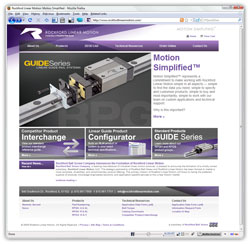
Rockford Linear Motion, a subsidiary of Rockford Ball Screw, has just launched their first ever online presence at www.rockfordlinearmotion.com. The site is powered by Adobe® ColdFusion® and Microsoft® SQL Server with content being managed by Mura CMS, a comprehensive web-based content management system. Rockford Linear Motion offers a fully customizable lineup of linear guide rail systems, products and services.

This was my first "commercial" web site constructed to be managed by Mura CMS. I was able to take our designer's (Greg L.) completely customized design from Adobe® Illustrator® + Photoshop® to CSS + XHTML and then fully integrate this design with Mura. I was also able to leverage and extend much of Mura's functionality to achieve the final result.

At the client's request, we also integrated the custom design with two other third-party vendors including Catalog Data Solutions and Network Solutions CommerceSpace™. Needless to say, I learned quite a bit about working with each of these vendors and look forward to working with them again.

Amazingly, we were able to launch the site within three (3) weeks of receiving the final design files for the site. As anyone who builds web sites would testify, this short of a timeframe is definitely not the norm. However, by utilizing Mura CMS and ColdFusion, we were able to get the job done in record time.

Congratulations to the folks at Rockford Linear Motion! Also, a huge thanks to each person who assisted me in keeping this project moving at light speed.

Rockford Linear Motion
Designer: Greg L. | Developer: Stephen Withington | Content Management System: Mura CMS

More Entries

© 2026, Stephen J. Withington, Jr.  |  Hosted by Hostek.com

Creative Commons License   |   This work is licensed under a Creative Commons Attribution 3.0 Unported License.