
Avoid Errors From Declaring Routines in Multiple Templates With CFSaveContent
So, you've got a function that you use in more than one place in your application. In fact, you might even need to use it in more than one place on your page. For example, you have a function you apply to your navigational elements to highlight them if the link matches the current page. Problem is, you've got separate files for each navigational area; one for the sub-nav, one for the primary nav, one for the footer, etc. The "easy" solution obviously would be to just include it once and be done ... but then you start testing things and such eventually you wish there were a way to have it included on each external file, but not generate the error message: "Routines cannot be declared more than once."
Well, did you know that you can wrap your nifty little function in a CFSaveContent block? By doing so, you create a variable that can be tested for and if it doesn't exist, create it on the fly. Pretty cool, eh?
Oh ... you want to see what I'm talking about? Ok.
Let's continue with the original example I gave above. Here's a simple function that checks the URL against a navigational link and if a match is found, the function returns a special CSS class. If no match is found, it returns an empty string.
<!--- navon.cfm --->
<cfscript>
function navon(s) {
var l = "";
var i = "";
for(i=1; i LTE listLen(s);i=i+1) {
l = listGetAt(s, i);
if(findnocase(l,cgi.script_name)) return " class=""nav_on""";
}
return "";
}
</cfscript>
Let's assume you maintain a separate file/template for your primary navigation and another for any sub-navigation. So maybe your primary navigation file looks something like this:
<!--- navPrimary.cfm --->
<cfinclude template="navon.cfm" />
<div id="topNav">
<ul>
<cfoutput>
<li><a href="index.cfm"#navon('index.cfm')#>Home</a></li>
<li><a href="/about/"#navon('/about/')#>About</a></li>
<li><a href="/contact/"#navon('/contact/')#>Contact</a></li>
<li><a href="/etc/"#navon('/etc/')#>Etc.</a></li>
</cfoutput>
</ul>
</div>
Here's a sample sub-nav:
<!--- navSub.cfm --->
<cfinclude template="navon.cfm" />
<div id="topNav">
<ul>
<cfoutput>
<li><a href="/contact/index.cfm"#navon('/contact/index.cfm')#>Contact Main</a></li>
<li><a href="/contact/form/"#navon('/contact/form/')#>Info Req. Form</a></li>
<li><a href="/contact/directions/"#navon('/contact/directions/')#>Directions</a></li>
</cfoutput>
</ul>
</div>
Now, if we were to execute the following code:
<!--- index.cfm --->
<style type="text/css">
a {
color: #0000FF;
}
a.nav_on {
color: #CC0000;
}
</style>
<cfinclude template="navPrimary.cfm" />
<cfinclude template="navSub.cfm" />
You should see an error message similar to the following:

All we have to do is wrap the function in a warm blanket of CFSaveContent like so:
<cfsavecontent variable="request.navScript">
<cfscript>
function navon(s) {
var l = "";
var i = "";
for(i=1; i LTE listLen(s);i=i+1) {
l = listGetAt(s, i);
if(findnocase(l,cgi.script_name)) return " class=""nav_on""";
}
return "";
}
</cfscript>
</cfsavecontent>
Then on each of the nav files, wrap the CFInclude block with a CFIF like so:
<cfif not isDefined("request.navScript")>
<cfinclude template="navon.cfm" />
</cfif>
Now if you try to pull up the index.cfm page created earlier, you should see something like this:
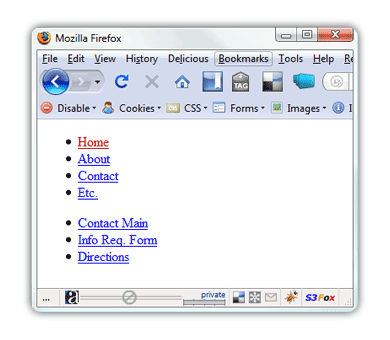
Now you can dynamically check to see if the function already exists ... and if it doesn't, create it.
Cheers!


Comments
<cfif NOT structKeyExists(variables, "navon") OR NOT isCustomFunction(variables.navon)>
<cfinclude template="navon.cfm" />
</cfif>