Using ColdFusion's onRequestStart Method Adds Whitespace to Templates

After banging my head against my desk (which is glass by the way!) I finally figured out how to resolve an issue that may affect others out there using the ColdFusion onRequestStart method in their Application.cfc.

What Happened?
I was attempting to build a dynamic page that returned only text so that I could consume it in Flash using some ActionScript magic. After getting some errors from Flash, I decided to check the ColdFusion template I was trying to access. On the surface, everything looked fine. However, once I did a "View Source", I noticed that the ColdFusion page had some extra whitespace and carriage returns in it. This is not good, because ActionScript wants to read the entire document, whitespace and all!

So off I went, trying <cfsetting enablecfoutputonly="true">. That didn't do a thing! So I threw another CF bomb at it by wrapping everything in <cfprocessingdirective suppresswhitespace="true"></cfprocessingdirective>. Nothing. I know, you're thinking <cfsilent> aren't you? It was already there my friends, and nada. I'm telling you I removed every extra space in that template's code and didn't get any closer to getting rid of the extra space.

And that's when it hit me ... check the Application.cfc and see if there's anything in there that might be generating it. So off I went again, going through each line of code in my Application.cfc. I decided to start commenting out some of the methods to see what, if any, impact it might have on the template. When I worked my way down to onRequestStart() and commented it out ... everything worked as it should! Well, that's great! BUT ... I still wanted to use my onRequestStart() code.

So to start with, let's take a look at some generic onRequestStart code:


    <cffunction name="onRequestStart">
    
        <cfargument name="request" required="true" />
    
        <!--- re-start application from URL with ?init --->
        <cfif isDefined("url.init")>
            <cfset onApplicationStart() />
        </cfif>

    </cffunction>

In order to still use the onRequestStart method, it turns out all I have to do is remove any and all white space and carriage returns in the onRequestStart method. So the revised code would look something like this:

<cffunction name="onRequestStart" access="public" output="true" hint="Fires when prior to page processing."><cfargument name="request" required="true" /><!--- re-start application from URL with ?init ---><cfif isDefined("url.init")><cfset onApplicationStart() /></cfif></cffunction>

Hopefully this saves someone else from a sore forehead.

Avoid Errors From Declaring Routines in Multiple Templates With CFSaveContent

So, you've got a function that you use in more than one place in your application. In fact, you might even need to use it in more than one place on your page. For example, you have a function you apply to your navigational elements to highlight them if the link matches the current page. Problem is, you've got separate files for each navigational area; one for the sub-nav, one for the primary nav, one for the footer, etc. The "easy" solution obviously would be to just include it once and be done ... but then you start testing things and such eventually you wish there were a way to have it included on each external file, but not generate the error message: "Routines cannot be declared more than once."

Well, did you know that you can wrap your nifty little function in a CFSaveContent block? By doing so, you create a variable that can be tested for and if it doesn't exist, create it on the fly. Pretty cool, eh?

Oh ... you want to see what I'm talking about? Ok.

Let's continue with the original example I gave above. Here's a simple function that checks the URL against a navigational link and if a match is found, the function returns a special CSS class. If no match is found, it returns an empty string.


<!--- navon.cfm --->
<cfscript>
function navon(s) {
    var l = "";
    var i = "";
    for(i=1; i LTE listLen(s);i=i+1) {
        l = listGetAt(s, i);
        if(findnocase(l,cgi.script_name)) return " class=""nav_on""";
    }
    return "";
}
</cfscript>

Let's assume you maintain a separate file/template for your primary navigation and another for any sub-navigation. So maybe your primary navigation file looks something like this:


<!--- navPrimary.cfm --->
<cfinclude template="navon.cfm" />
<div id="topNav">
    <ul>
        <cfoutput>
            <li><a href="index.cfm"#navon('index.cfm')#>Home</a></li>
            <li><a href="/about/"#navon('/about/')#>About</a></li>
            <li><a href="/contact/"#navon('/contact/')#>Contact</a></li>
            <li><a href="/etc/"#navon('/etc/')#>Etc.</a></li>
        </cfoutput>
    </ul>
</div>

Here's a sample sub-nav:


<!--- navSub.cfm --->
<cfinclude template="navon.cfm" />
<div id="topNav">
    <ul>
        <cfoutput>
            <li><a href="/contact/index.cfm"#navon('/contact/index.cfm')#>Contact Main</a></li>
            <li><a href="/contact/form/"#navon('/contact/form/')#>Info Req. Form</a></li>
            <li><a href="/contact/directions/"#navon('/contact/directions/')#>Directions</a></li>
        </cfoutput>
    </ul>
</div>

Now, if we were to execute the following code:


<!--- index.cfm --->
<style type="text/css">
a {
    color: #0000FF;
}
a.nav_on {
    color: #CC0000;
}
</style>
<cfinclude template="navPrimary.cfm" />
<cfinclude template="navSub.cfm" />

You should see an error message similar to the following:

All we have to do is wrap the function in a warm blanket of CFSaveContent like so:


<cfsavecontent variable="request.navScript">
    <cfscript>
    function navon(s) {
        var l = "";
        var i = "";
        for(i=1; i LTE listLen(s);i=i+1) {
            l = listGetAt(s, i);
            if(findnocase(l,cgi.script_name)) return " class=""nav_on""";
        }
        return "";
    }
    
</cfscript>
</cfsavecontent>

Then on each of the nav files, wrap the CFInclude block with a CFIF like so:


<cfif not isDefined("request.navScript")>
    <cfinclude template="navon.cfm" />
</cfif>

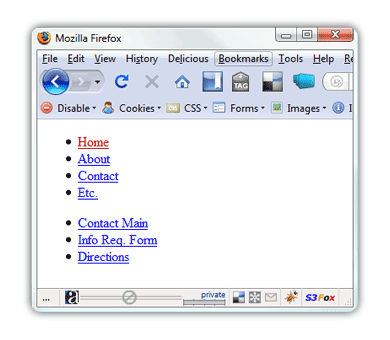
Now if you try to pull up the index.cfm page created earlier, you should see something like this:

Now you can dynamically check to see if the function already exists ... and if it doesn't, create it.

Cheers!

Use ColdFusion's CFFeed to Display Your Twitter Tweets (and more!) on Your Blog in 30 Seconds

As Twitter's popularity continues to increase, users and consumers of the information being broadcast are looking for quick and easy ways to integrate some of the information into their own content. So I whipped up this short, but sweet, example of how easy it is to repurpose content from Twitter using just a dash of ColdFusion.

First things first though, what makes consuming information from Twitter so easy is their search functionality. Check it out at http://search.twitter.com. By following the instructions there, you will see that anything you search for can be "burned" via RSS. After your search, following the link "Feed for this query" and viola! Instant RSS feed you can now consume. How sweet it is.

What's really cool is that if you search for let's say "stevewithington" you can see not only my posts, but also any responses too. If you only want to see tweets "from" me for example, then you simply put "from:" in front of your search criteria such as "from:stevewithington."

For sake of simplicity, I'm going to just follow the "Feed for this query" link and continue on.

If you're using ColdFusion 8, then all you have to do is use CFFeed to consume the feed. Here's a sample line of code:


<cfset feedurl="http://search.twitter.com/search.atom?q=from%3Astevewithington" />
<cffeed
    source="#feedurl#"
    properties="feedmeta"
    query="feeditems" />

If you're curious as to what the feed contains, you can always use CFDump to find out:


<cfdump var="#feeditems#" label="feedItems" />

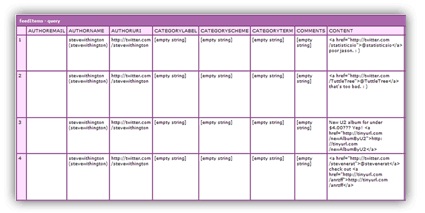
Using the above line of code, you should see something similar to the following:

As you'll see, CFFeed creates a very nice query object containing quite a bit of information for you. One field of interest at this point is the "CONTENT" field which contains HTML-formatted code for each tweet. If you prefer a "text-only" version of the tweet, then simply use the "TITLE" field. So, to show how easy this is, let's just loop over the feed items and output the "CONTENT."


<ol>
<cfoutput query="feeditems">
    <li>#content#</li>
</cfoutput>
</ol>

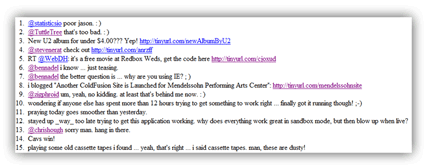
Running the above line of code, you should see something like this:

I know, I know, you're probably thinking, "there's got to be more to it, right?" Well, there is if you want there to be! Using CFDump, you saw all kinds of information you can repurpose to your heart's desire. Think up new ways to use Twitter and with ColdFusion's CFFeed you can create new ways to consume it's easy-to-integrate-and-embed information.

More Entries

© 2026, Stephen J. Withington, Jr.  |  Hosted by Hostek.com

Creative Commons License   |   This work is licensed under a Creative Commons Attribution 3.0 Unported License.